
Why Using Cloudflare as a CDN — and Configuring Firewall Rules Correctly — Actually Matters
Most websites today run on cloud infrastructure, yet a surprising number still rely on default configurations when it comes to content delivery and security. Turning on a CDN or enabling a firewall checkbox is not the same as architecting a resilient, performant, and defensible web presence.
Using Cloudflare as a CDN and configuring firewall rules properly is no longer optional for professional-grade websites. It directly impacts performance, availability, security posture, SEO, brand trust, and incident survivability.
This article explains why Cloudflare matters, what many sites get wrong, and how expert-level configuration changes outcomes.
The modern web threat landscape doesn’t care how “small” your site is
Web attacks are no longer manual or targeted only at large enterprises.
They are:
- automated
- continuous
- opportunistic
- cheap to launch
- indiscriminate
Industry data consistently shows that the majority of attacks seen by CDNs are background internet noise—credential stuffing, bot scraping, injection attempts, and volumetric abuse looking for any exposed surface.
A site without a properly configured edge layer is effectively saying:
“Hit my origin directly and see what breaks.”
That is not a professional stance.
Cloudflare as a CDN is not just about speed
Yes, Cloudflare makes websites faster — but that’s the baseline
At its core, a Content Delivery Network:
- caches static assets closer to users
- reduces round-trip latency
- absorbs traffic spikes
- offloads work from origin servers
Cloudflare operates one of the largest edge networks globally, meaning:
- content is served from locations physically closer to users
- TLS handshakes are terminated at the edge
- packet loss and latency variability are reduced
This matters for:
- user experience
- conversion rates
- crawl efficiency
- Core Web Vitals
- resilience during traffic surges or media coverage
But performance is only half the value.
The CDN is also your first security perimeter
When configured properly, Cloudflare becomes a reverse-proxy security layer that:
- hides your origin IP
- filters malicious traffic
- blocks bad actors before they reach your server
- absorbs DDoS attacks automatically
- enforces protocol and request sanity
This changes your threat model completely.
Instead of defending:
one server with finite resources
You are defending behind:
a globally distributed edge designed to fail safely
That difference is existential during real incidents.
Why “default Cloudflare settings” are not enough
Many sites enable Cloudflare and stop there.
This creates a false sense of security.
Out of the box:
- firewall rules are permissive
- bot controls are generic
- rate limits are rarely tuned
- application logic is not protected
- admin endpoints remain exposed
- API abuse often goes unchecked
Professionals treat Cloudflare as a policy enforcement engine, not a toggle.
Firewall rules: where amateurs stop and experts begin
Firewall rules at the edge are what turn Cloudflare from “helpful” into mission-critical infrastructure.
1. Reducing attack surface intentionally
A professional configuration actively limits:
- access to
/wp-admin,/xmlrpc.php,/api/,/login - access by geography where appropriate
- non-browser traffic hitting human-only endpoints
- outdated or malformed user agents
This is not paranoia — it is surface minimisation.
If an endpoint does not need global, anonymous access, it should not have it.
2. Blocking bad behaviour, not just bad IPs
Modern attacks rotate IPs constantly. Blocking IPs alone is ineffective.
Expert firewall logic focuses on:
- request behaviour
- rate anomalies
- header integrity
- protocol compliance
- bot fingerprints
Cloudflare allows rules such as:
- block requests missing expected headers
- challenge abnormal request rates
- block non-browser traffic from admin paths
- enforce HTTP method sanity (e.g. POST where only GET makes sense)
This stops attacks by pattern, not by whack-a-mole.
3. Web Application Firewall (WAF) rules that matter
Cloudflare’s managed WAF rulesets are built around OWASP categories:
- SQL injection
- cross-site scripting
- command injection
- path traversal
- deserialisation attacks
But professionals:
- tune sensitivity levels
- disable noisy rules that cause false positives
- layer custom rules on top of managed rules
- monitor rule triggers and refine over time
Security that breaks legitimate traffic is not security — it’s misconfiguration.
Bot management: the invisible threat most sites ignore
Bots are not all bad — but many are.
Common malicious bot activity includes:
- scraping proprietary content
- credential stuffing
- price scraping
- form abuse
- fake analytics inflation
- brute force login attempts
Expert Cloudflare setups:
- distinguish verified bots (Google, Bing) from fakes
- challenge or throttle unknown automation
- block headless browsers where appropriate
- enforce JavaScript challenges only when necessary
This protects:
- server resources
- analytics accuracy
- SEO integrity
- application stability
Rate limiting: the quiet hero of stability
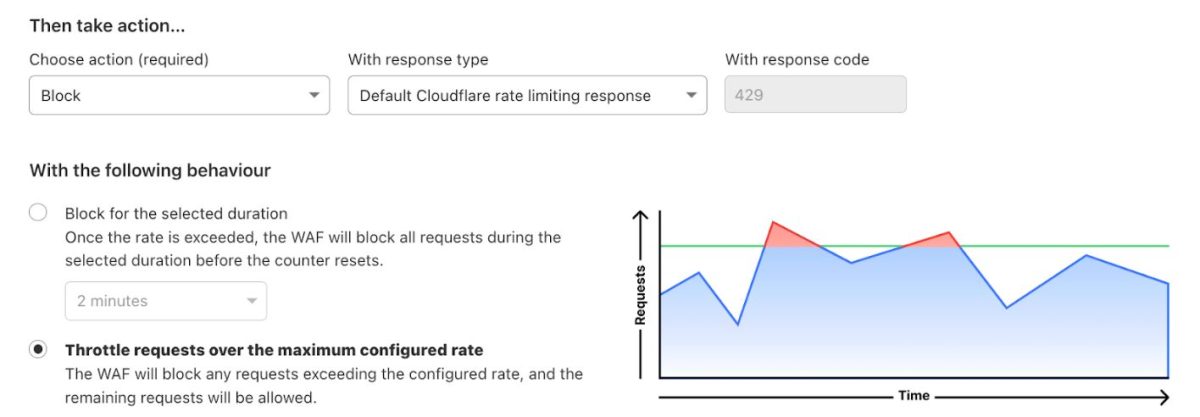
Many outages are not caused by hackers — they’re caused by unexpected load.
Rate limiting:
- prevents login brute force
- stops abusive crawlers
- protects APIs from accidental overuse
- contains runaway integrations
Professionals define:
- per-endpoint limits
- per-IP or per-session thresholds
- burst tolerance with sustained caps
- clear block vs challenge responses
This is how sites stay online during:
- media attention
- viral traffic
- misconfigured clients
- scraping storms
Security, performance, and SEO are no longer separate disciplines
Search engines increasingly reward:
- fast sites
- reliable sites
- secure sites
- sites with low downtime
- sites resistant to abuse
A properly configured Cloudflare edge:
- improves crawl efficiency
- reduces server errors
- stabilises TTFB globally
- prevents spam-driven quality signals
- protects brand trust signals
Security failures are now SEO failures, not just IT problems.
Brand trust lives at the infrastructure layer
From a PR and reputation perspective:
- downtime during coverage is remembered
- hacked pages get indexed
- injected spam damages authority
- leaked data destroys credibility
- slow sites feel unprofessional
Audiences never say:
“Their firewall rules were bad.”
They say:
“This brand doesn’t feel reliable.”
Infrastructure is part of brand perception.
What a professional Cloudflare setup actually looks like
A mature setup includes:
- CDN caching strategy aligned to content type
- origin IP fully locked down
- WAF enabled and tuned
- custom firewall rules for application logic
- bot management configured intentionally
- rate limiting on sensitive endpoints
- logging and alerting reviewed regularly
- documented change control
This is ongoing operational work, not a one-time switch.
Cloudflare Page Rules for Securing and Optimising a WordPress Site
When correctly configured, Cloudflare Page Rules act as a front-line control plane for protecting, accelerating, and stabilising a WordPress site.
While Cloudflare now promotes Cache Rules and Rulesets, Page Rules remain critical for legacy configurations and high-precision URL-based control — particularly for WordPress environments where admin paths, dynamic requests, and authenticated traffic must be handled differently.
This article outlines battle-tested Page Rules, explains why each exists, and shows how they work together to reduce attack surface, prevent cache poisoning, and improve performance without breaking core WordPress functionality.
Rule 1: Protect the WordPress Admin Area
URL Pattern
example.com/wp-admin*
Recommended Settings
- Security Level: High
- Disable Performance
- Disable Apps
- Disable Cache
Why this matters
/wp-admin/ is the primary target for:
- Credential stuffing
- XML-RPC amplification attacks
- Admin brute force attempts
Disabling caching and performance features ensures:
- No sensitive admin responses are cached
- Dynamic admin sessions remain intact
- JavaScript optimisation does not interfere with nonce validation
Security impact:
Reduces attack automation effectiveness and prevents cached admin artefacts.
Rule 2: Harden the Login Endpoint
URL Pattern
example.com/wp-login.php*
Recommended Settings
- Security Level: High (or I’m Under Attack during incidents)
- Disable Cache
- Disable Performance
Why this matters
wp-login.php is often hit thousands of times per hour during attacks. This rule:
- Forces Cloudflare’s challenge system
- Prevents cached login pages
- Ensures bot mitigation happens before WordPress executes PHP
Optional enhancement:
Combine with Cloudflare WAF rules limiting POST requests to /wp-login.php.
Rule 3: Disable Caching for Preview, AJAX, and Dynamic Endpoints
URL Patterns
example.com/*preview=true*
example.com/wp-json*
example.com/wp-admin/admin-ajax.php*
Recommended Settings
- Cache Level: Bypass
- Disable Performance
Why this matters
These endpoints are user-specific or session-aware:
- Gutenberg previews
- REST API responses
- AJAX actions (cart updates, form submissions, live search)
Caching them causes:
- Broken previews
- Data leakage between users
- Invalid JSON responses
Rule 4: Force HTTPS Across the Entire Site
URL Pattern
http://example.com/*
Recommended Settings
- Always Use HTTPS: On
- Automatic HTTPS Rewrites: On
Why this matters
Even one HTTP endpoint can:
- Break authentication cookies
- Trigger mixed-content warnings
- Downgrade transport security
This rule ensures TLS consistency and prevents protocol downgrade attacks.
Rule 5: Aggressive Caching for Static Assets
URL Pattern
example.com/wp-content/*
Recommended Settings
- Cache Level: Cache Everything
- Edge Cache TTL: 1 month
- Browser Cache TTL: 1 month
- Disable Security (optional for assets)
Why this matters
Most WordPress performance bottlenecks come from:
- Images
- CSS
- JavaScript
- Fonts
This rule:
- Pushes static assets to Cloudflare’s edge
- Reduces origin load
- Improves Core Web Vitals
Important:
Ensure WordPress or your build process uses cache-busting query strings or hashed filenames.
Rule 6: Bypass Cache for Logged-In Users
URL Pattern
example.com/*
Recommended Settings
- Cache Level: Bypass (conditional)
Implementation note
This rule must be combined with a Cloudflare cookie-based rule:
- If cookie contains
wordpress_logged_in - Bypass cache
Why this matters
Logged-in users receive:
- Personalised admin bars
- User-specific content
- Nonce-protected actions
Caching these responses causes cross-user data leakage — one of the most serious WordPress security failures.
Rule 7: XML-RPC Attack Mitigation (Optional but Recommended)
URL Pattern
example.com/xmlrpc.php*
Recommended Settings
- Security Level: High
- Disable Cache
- Rate Limiting (via WAF)
Why this matters
XML-RPC is frequently abused for:
- Brute force amplification
- DDoS reflection
- Credential stuffing
If not required, disable XML-RPC entirely at the server level and block it at Cloudflare.
Rule Priority Order (Critical)
Cloudflare Page Rules are evaluated top-down.
Recommended Order
/wp-admin*/wp-login.php*/xmlrpc.php*- Dynamic endpoints (
admin-ajax,wp-json) - Static assets (
/wp-content/*) - Global HTTPS rule
Incorrect ordering is one of the most common causes of broken WordPress sites behind Cloudflare.
Common Mistakes to Avoid
- ❌ Caching
wp-adminorwp-login.php - ❌ Applying “Cache Everything” globally
- ❌ Ignoring logged-in cookies
- ❌ Letting optimisation features rewrite admin JavaScript
- ❌ Treating WordPress like a static site
The bottom line
Using Cloudflare as a CDN matters because it:
- shifts performance to the edge
- absorbs attacks by default
- hides your origin
- stabilises traffic under stress
Configuring firewall rules professionally matters because it:
- reduces attack surface
- stops automated abuse
- protects application logic
- prevents reputational damage
- keeps sites online when it matters most
In 2026, security and performance are table stakes.
What differentiates professionals is how deliberately those tools are used.
